ArkTS Example
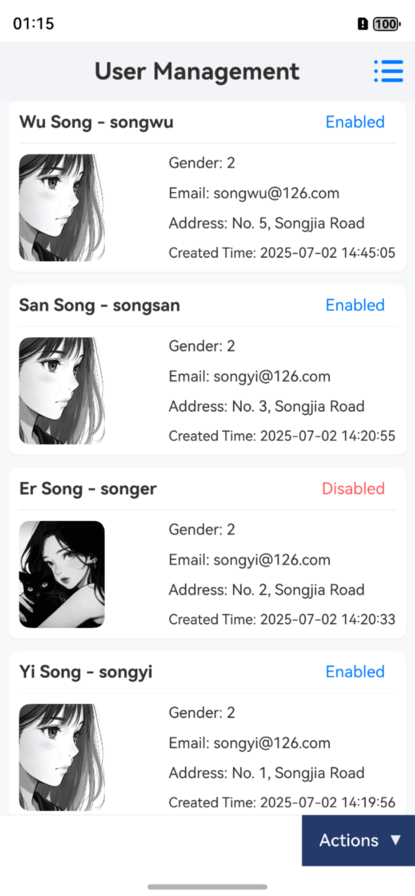

Overview
This example demonstrates how to integrate ApiSorcery with HarmonyOS ArkTS projects. ArkTS is Huawei's programming language for HarmonyOS development, providing a modern development experience for building native HarmonyOS applications.
Features
- HarmonyOS native: Optimized for HarmonyOS ecosystem and APIs
- Type safety: Full ArkTS type support with generated interfaces
- @ohos/axios integration: Built-in support for HarmonyOS-adapted HTTP client
- Distributed capabilities: Support for HarmonyOS distributed features
- Performance optimized: Optimized for HarmonyOS runtime and memory management
Quick Setup
1. Install ApiSorcery
bash
npm install -g autoapi2. Initialize Configuration
bash
autoapi init -l arkTsThis creates a .autoapirc.json configuration file:
json
{
  "application": {
    "language": "arkTs",
    "outputDir": "./src/main/ets/api/auto"
  },
  "services": [
    {
      "code": "demo",
      "token": "72735b33815c4e5c9c2a924a8f4907ef",
      "version": 3,
      "enabled": true,
      "source": "https://your-api.com/swagger.json"
    }
  ]
}
3. Install Dependencies
Add the required dependencies to your oh-package.json5:
json
{
  "dependencies": {
    "@ohos/axios": "^2.2.0"
  }
}
4. Configure Network Permissions
Add network permissions in src/main/module.json5:
json
{
  "requestPermissions": [
    {
      "name": "ohos.permission.INTERNET"
    }
  ]
}
5. Generate API Client
bash
autoapi generate6. Use in ArkTS
typescript
import * as ApiUser from '../apis/auto/demo/ApiUser';
import { GetUserPagedResponse,UserPageQueryDto,UserInfoDto } from '../api/auto/demo/model';

@Entry
@Component
struct UserPage {
  @State users: User[] = [];
  @State loading: boolean = false;

  async aboutToAppear() {
    await this.loadUsers();
  }

  async loadUsers() {
    this.loading = true;
    try {
      const response = await ApiUser.getUserPaged({
        pagination:{
          page: 1,
          limit: 10
        }
      } as UserPageQueryDto);
      this.users = (res.results || []) as UserInfoDto[];
    } catch (error) {
      console.error('Failed to fetch users:', error);
    } finally {
      this.loading = false;
    }
  }

  build() {
    Column() {
      if (this.loading) {
        LoadingProgress()
          .width(50)
          .height(50)
      } else {
        List() {
          ForEach(this.users, (user: User) => {
            ListItem() {
              Text(user.name)
                .fontSize(16)
                .padding(10)
            }
          })
        }
      }
    }
    .width('100%')
    .height('100%')
  }
}
HarmonyOS-specific Features
Distributed Data Management
typescript
import distributedKVStore from '@ohos.data.distributedKVStore';

class UserService {
  private apiMain = new ApiMain();
  private kvStore?: distributedKVStore.SingleKVStore;

  async syncUserData(userId: string) {
    const userData = await this.apiMain.getUser(userId);
    // Sync with distributed KV store
    if (this.kvStore) {
      await this.kvStore.put(`user_${userId}`, JSON.stringify(userData.data));
    }
  }
}
Background Task Integration
typescript
import backgroundTaskManager from '@ohos.resourceschedule.backgroundTaskManager';

class DataSyncService {
  private apiMain = new ApiMain();

  async startBackgroundSync() {
    const requestInfo: backgroundTaskManager.BackgroundTaskInfo = {
      bgMode: backgroundTaskManager.BackgroundMode.DATA_TRANSFER,
      wantAgent: undefined,
    };

    backgroundTaskManager
      .startBackgroundRunning(getContext(), requestInfo)
      .then(() => {
        this.performDataSync();
      });
  }

  private async performDataSync() {
    try {
      const response = await this.apiMain.syncData();
      console.log('Background sync completed:', response.data);
    } catch (error) {
      console.error('Background sync failed:', error);
    }
  }
}
Best Practices
- Permission Management: Properly request and handle network permissions
- Lifecycle Management: Integrate API calls with HarmonyOS component lifecycle
- Error Handling: Implement HarmonyOS-specific error handling patterns
- Performance: Use HarmonyOS performance optimization techniques
- Distributed Features: Leverage HarmonyOS distributed capabilities when applicable