Flutter Example


Project Setup
For installation, configuration, and first-time setup, see the Flutter Tutorial.
Overview
This example demonstrates how to integrate ApiSorcery with Flutter/Dart projects. Flutter is Google's UI toolkit for building natively compiled applications for mobile, web, and desktop from a single codebase.
Features
- Cross-platform development: Build for iOS, Android, Web, and Desktop with one codebase
- Type-safe API clients: Generate strongly-typed Dart classes from Swagger/OpenAPI specifications
- Dio integration: Built-in support for Dio HTTP client with interceptors and error handling
- Null safety: Full support for Dart's null safety features
- Future/async support: Native async/await pattern integration
Demo Functionality
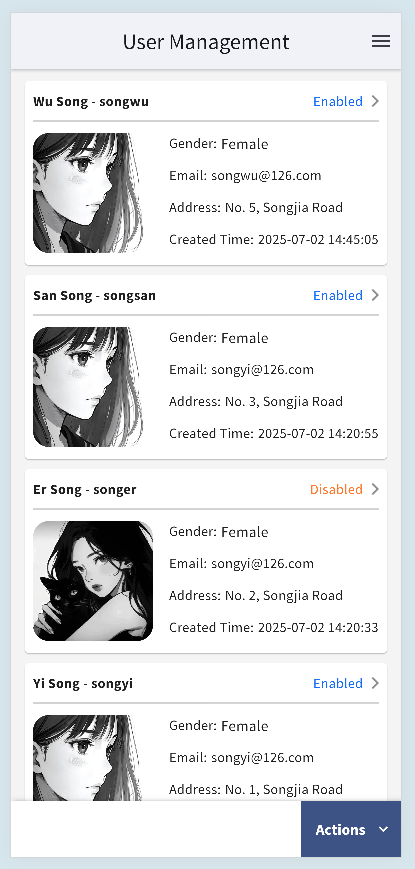
This demo app implements a complete User Management module backed by a live API:
- Paginated list — infinite scroll with filtering by code, name, and status; pull-to-refresh
- Full CRUD — create, view, edit, and delete user records
- Avatar upload — upload images via
POST /file/upload, with 10 MB size validation - Excel export — download filtered results as
.xlsxacross all platforms (Web/iOS/Android/Desktop) - Field validation — async uniqueness check for the
codefield before form submission
Code Examples
Paginated List
dart
import 'package:autoapi_example_flutter/apis/auto/demo/api_user.dart';
import 'package:autoapi_example_flutter/apis/auto/demo/model.dart';

Future<void> fetchUsers({ required int page, String? code, String? name }) async {
  final params = UserPageQueryDto(
    pagination: Pagination(page: page, limit: 10),
    code: code,
    name: name,
  );
  final res = await ApiUser.getUserPaged(params);
  final users = res.results ?? <UserInfoDto>[];
  final totalPages = ((res.total ?? 0) / 10).ceil();
}
Avatar Upload
dart
import 'package:autoapi_example_flutter/apis/auto/demo/api_file.dart';
import 'package:autoapi_example_flutter/apis/auto/demo/model.dart';

Future<String?> uploadAvatar(MultipartFile file) async {
  const maxBytes = 10 * 1024 * 1024; // 10 MB
  if (file.length > maxBytes) {
    throw Exception('File size exceeds 10 MB limit');
  }
  final fileId = await ApiFile.uploadFile(UploadFileRequest(file: file));
  return '${Config.apiHost}/file/$fileId'; // build full image URL
}
Excel Export
dart
import 'package:autoapi_example_flutter/apis/auto/demo/api_user.dart';
import 'package:autoapi_example_flutter/apis/auto/demo/model.dart';

Future<void> exportUsers({ String? code, String? name }) async {
  final blobRes = await ApiUser.exportUsers(
    ExportUsersRequest(code: code ?? '', name: name ?? ''),
  );
  // blobRes.data contains the raw bytes; blobRes.name is the suggested filename
  await saveFile(blobRes.data!, blobRes.name ?? 'users.xlsx');
}
Platform-specific Considerations
Mobile (iOS/Android)
- Configure network permissions in platform-specific files
- Handle network security configurations for HTTP endpoints
Web
- Configure CORS properly on your backend server
- Consider web-specific limitations for certain HTTP features
Desktop
- Native networking works out of the box
- Consider platform-specific certificate handling if needed
Best Practices
- Error Handling: Implement comprehensive error handling with proper exception types
- State Management: Integrate with your preferred state management solution (Provider, Bloc, Riverpod)
- Caching: Implement appropriate caching strategies using Dio interceptors
- Testing: Write unit tests for your API clients using mockito
- Code Generation: Use
build_runnerfor JSON serialization code generation