Vue Example


Project Setup
For installation, configuration, and first-time setup, see the Vue Tutorial.
Overview
This example demonstrates how to integrate ApiSorcery with Vue projects. Vue is a progressive JavaScript framework for building user interfaces, and with TypeScript support, it provides an excellent developer experience with the Composition API and reactive state management.
Features
- Type safety: Full TypeScript support with generated interfaces and types
- Composition API: Modern Vue patterns with reactive state management
- Axios integration: Built-in support for Axios HTTP client with interceptors
- IntelliSense support: Full IDE support with auto-completion and type checking
- Tree shaking: Optimized bundle size with ES modules support
Demo Functionality
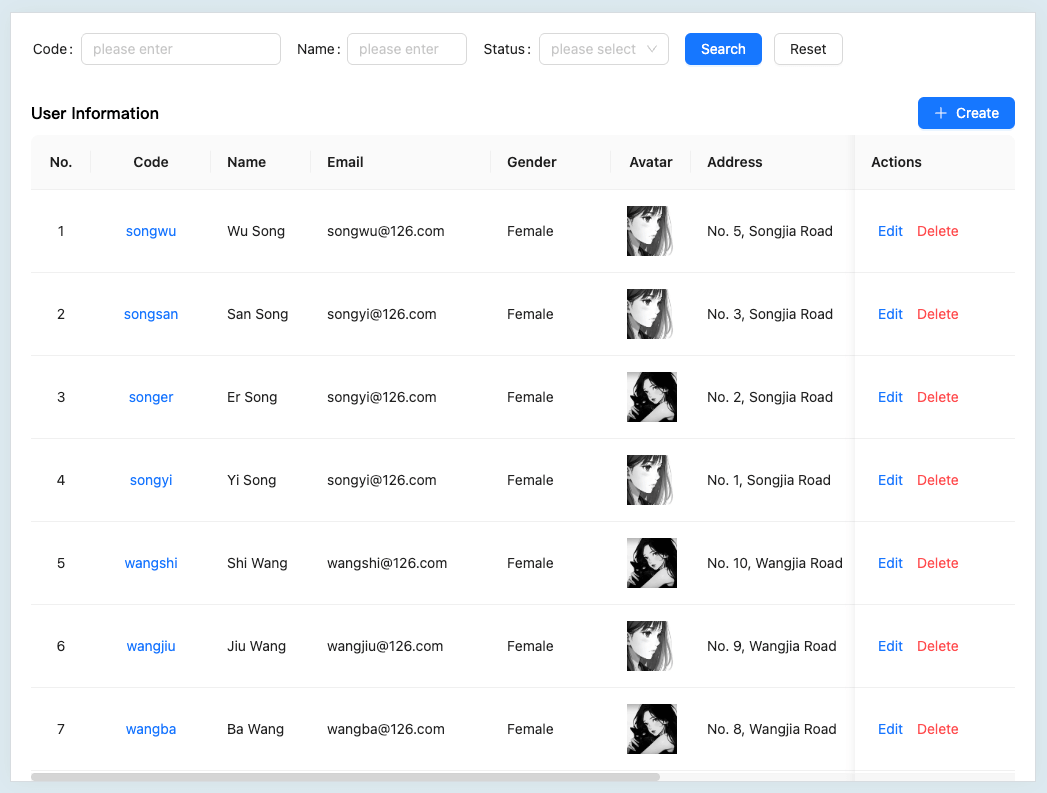
This demo app implements a complete User Management module backed by a live API:
- Paginated list — query users with filtering by code, name, and status
- Full CRUD — create, view, edit, and delete user records
- Avatar upload — upload images via
POST /file/upload, with 10 MB size validation - Excel export — download filtered results as
.xlsxvia the Blob response - Field validation — async uniqueness check for the
codefield before form submission
Code Examples
Paginated List with Composable
typescript
// composables/useUserList.ts
import { ref, onMounted } from 'vue';
import * as ApiUser from '@/api/auto/demo/ApiUser';
import type { UserInfoDto } from '@/api/auto/demo/model';

export function useUserList() {
  const users = ref<UserInfoDto[]>([]);
  const total = ref(0);
  const loading = ref(false);
  const page = ref(1);

  const fetchUsers = async (filters?: { code?: string; name?: string }) => {
    loading.value = true;
    try {
      const res = await ApiUser.getUserPaged({
        pagination: { page: page.value, limit: 10 },
        code: filters?.code || '',
        name: filters?.name || '',
      });
      users.value = res.results || [];
      total.value = res.total || 0;
    } catch (err) {
      console.error('Failed to fetch users:', err);
    } finally {
      loading.value = false;
    }
  };

  onMounted(() => fetchUsers());
  return { users, total, loading, page, refetch: fetchUsers };
}
Excel Export
typescript
import * as ApiUser from '@/api/auto/demo/ApiUser';

async function handleExport(filters: { code?: string; name?: string }) {
  const response = await ApiUser.exportUsers({
    code: filters.code || '',
    name: filters.name || '',
  });
  const url = URL.createObjectURL(response.data);
  const link = document.createElement('a');
  link.href = url;
  link.download = response.name || 'users.xlsx';
  link.click();
  URL.revokeObjectURL(url);
}
Avatar Upload
typescript
import * as ApiFile from '@/api/auto/demo/ApiFile';

async function uploadAvatar(file: File): Promise<string> {
  const sizeMB = file.size / 1024 / 1024;
  if (sizeMB > 10) throw new Error(`File size (${sizeMB.toFixed(2)} MB) exceeds the 10 MB limit`);
  const fileId = await ApiFile.uploadFile({ file });
  return `${import.meta.env.VITE_API_BASE_URL}/file/${fileId}`;
}
Best Practices
- Type Definitions: Leverage generated TypeScript interfaces for better type safety
- Composables: Create reusable composables for common API operations
- Error Handling: Implement proper error handling with Vue's error handling mechanisms
- Request Interceptors: Use Axios interceptors for authentication and request/response transformation
- Environment Configuration: Use different API endpoints for development, staging, and production
- Code Splitting: Implement lazy loading for API modules and routes to optimize bundle size
- Reactive State: Utilize Vue's reactivity system for efficient state management