HarmonyOS Example

Project Setup
For installation, configuration, and first-time setup, see the HarmonyOS Tutorial.
Overview
This example demonstrates how to integrate ApiSorcery with HarmonyOS ArkTS projects. ArkTS is Huawei's programming language for HarmonyOS development, providing a modern development experience for building native HarmonyOS applications.
Features
- HarmonyOS native: Optimized for HarmonyOS ecosystem and APIs
- Type safety: Full ArkTS type support with generated interfaces
- @ohos/axios integration: Built-in support for HarmonyOS-adapted HTTP client
- Distributed capabilities: Support for HarmonyOS distributed features
- Performance optimized: Optimized for HarmonyOS runtime and memory management
Demo Functionality
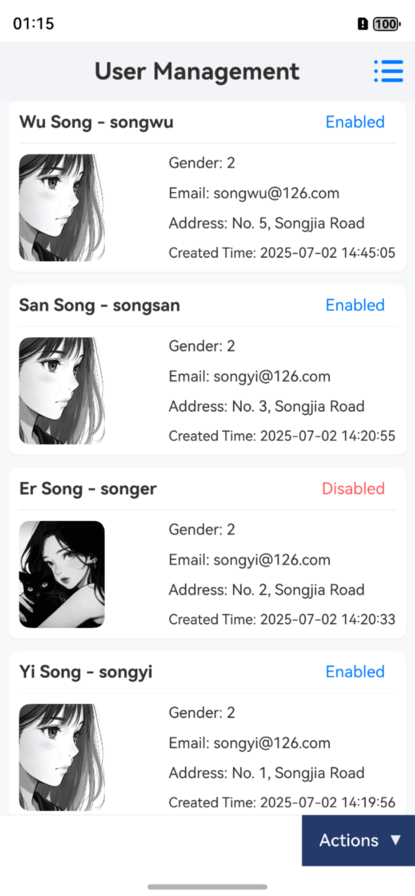
This demo app implements a complete User Management module backed by a live API:
- Paginated list — query users with filtering by code, name, and status
- Full CRUD — create, view, edit, and delete user records
- Avatar upload — upload images via
POST /file/upload, with 10 MB size validation - Excel export — download filtered results as
.xlsxvia the Blob response - Field validation — async uniqueness check for the
codefield before form submission
Code Examples
Paginated List
typescript
import * as ApiUser from '../apis/auto/demo/ApiUser';
import { UserPageQueryDto, UserInfoDto } from '../api/auto/demo/model';

@Entry
@Component
struct UserPage {
  @State users: UserInfoDto[] = [];
  @State total: number = 0;
  @State loading: boolean = false;
  private page: number = 1;

  async aboutToAppear() {
    await this.loadUsers();
  }

  async loadUsers(code: string = '', name: string = '') {
    this.loading = true;
    try {
      const res = await ApiUser.getUserPaged({
        pagination: { page: this.page, limit: 10 },
        code,
        name,
      } as UserPageQueryDto);
      this.users = (res.results || []) as UserInfoDto[];
      this.total = res.total || 0;
    } catch (error) {
      console.error('Failed to fetch users:', error);
    } finally {
      this.loading = false;
    }
  }

  build() {
    Column() {
      if (this.loading) {
        LoadingProgress()
          .width(50)
          .height(50)
      } else {
        List() {
          ForEach(this.users, (user: UserInfoDto) => {
            ListItem() {
              Text(user.name)
                .fontSize(16)
                .padding(10)
            }
          })
        }
      }
    }
    .width('100%')
    .height('100%')
  }
}
Excel Export
typescript
import * as ApiUser from '../apis/auto/demo/ApiUser';
import { ExportUsersRequest } from '../api/auto/demo/model';
import fs from '@ohos.file.fs';

async function exportUsers(code = '', name = '') {
  const blobRes = await ApiUser.exportUsers({ code, name } as ExportUsersRequest);
  // Write bytes to local file and share or open
  const filePath = `${getContext().filesDir}/${blobRes.name ?? 'users.xlsx'}`;
  const file = fs.openSync(filePath, fs.OpenMode.CREATE | fs.OpenMode.WRITE_ONLY);
  fs.writeSync(file.fd, blobRes.data!.buffer);
  fs.closeSync(file);
}
Avatar Upload
typescript
import * as ApiFile from '../apis/auto/demo/ApiFile';
import { UploadFileRequest } from '../api/auto/demo/model';
import picker from '@ohos.file.picker';

async function uploadAvatar(): Promise<string> {
  const photoPicker = new picker.PhotoViewPicker();
  const result = await photoPicker.select({ maxSelectNumber: 1 });
  const filePath = result.photoUris[0];
  const fileId = await ApiFile.uploadFile({ file: filePath } as UploadFileRequest);
  return `${BASE_URL}/file/${fileId}`;
}
HarmonyOS-specific Features
Distributed Data Management
typescript
import distributedKVStore from '@ohos.data.distributedKVStore';

class UserService {
  private apiMain = new ApiMain();
  private kvStore?: distributedKVStore.SingleKVStore;

  async syncUserData(userId: string) {
    const userData = await this.apiMain.getUser(userId);
    // Sync with distributed KV store
    if (this.kvStore) {
      await this.kvStore.put(`user_${userId}`, JSON.stringify(userData.data));
    }
  }
}
Background Task Integration
typescript
import backgroundTaskManager from '@ohos.resourceschedule.backgroundTaskManager';

class DataSyncService {
  private apiMain = new ApiMain();

  async startBackgroundSync() {
    const requestInfo: backgroundTaskManager.BackgroundTaskInfo = {
      bgMode: backgroundTaskManager.BackgroundMode.DATA_TRANSFER,
      wantAgent: undefined,
    };

    backgroundTaskManager
      .startBackgroundRunning(getContext(), requestInfo)
      .then(() => {
        this.performDataSync();
      });
  }

  private async performDataSync() {
    try {
      const response = await this.apiMain.syncData();
      console.log('Background sync completed:', response.data);
    } catch (error) {
      console.error('Background sync failed:', error);
    }
  }
}
Best Practices
- Permission Management: Properly request and handle network permissions
- Lifecycle Management: Integrate API calls with HarmonyOS component lifecycle
- Error Handling: Implement HarmonyOS-specific error handling patterns
- Performance: Use HarmonyOS performance optimization techniques
- Distributed Features: Leverage HarmonyOS distributed capabilities when applicable